
Project settings > Eido > Standards has two tabs, Lessons and Project packs. When Eido gets something wrong, a lesson is raised, and the same mistake again is a vote. You approve the lessons that matter into a pack, and every later run in the project reads it. How lessons are raised: Teaching Eido.
Lessons#
Every lesson the project raised, most voted first, filtered by Status. Anyone in the project can add Your vote.
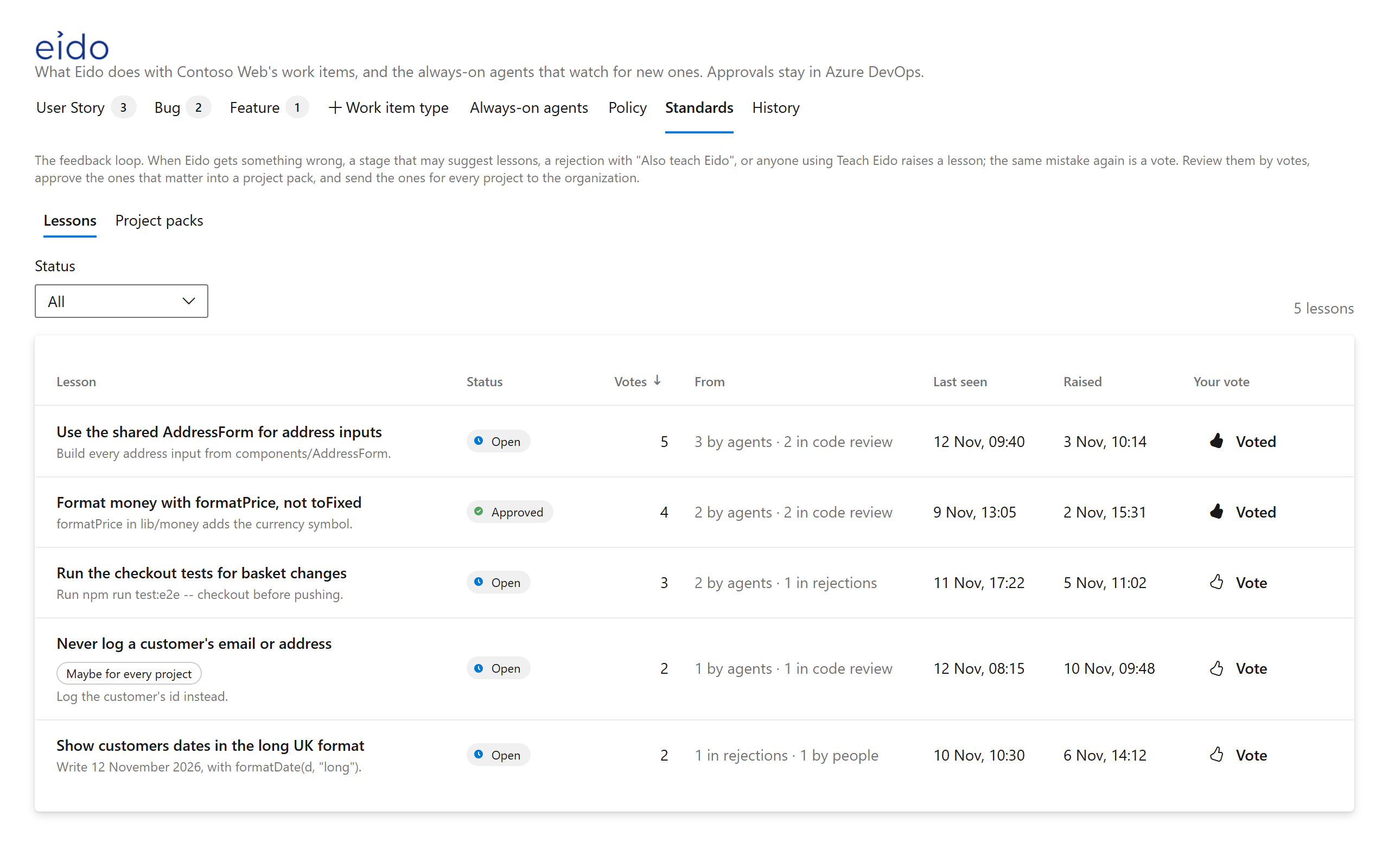
| Label | Means |
|---|---|
| Not followed | A pack already has this rule, and a run broke it. See Not followed lessons. |
| Maybe for every project | Whoever raised it suggested it applies to every project. |
| With the organization | The organization’s admins decide it now. |
Deciding a lesson#
Only Project Administrators decide.
-
Open it
Every time it came up lists each vote, with its work item or pull request.
-
Make it a general rule
Edit the Title and Rule (Markdown) so it covers every future change, not one case.
-
Decide
Under Decide, pick one of these.
| Do this | What happens |
|---|---|
| Pick a pack under Add it to this project’s standards, then Approve | It is added to the end of that pack. A new pack… starts one. |
| Reject… | It stays rejected, with your reason. Reopen brings it back. |
| Send to the organization… | Its admins decide it, and every project can vote for it. See Standards. |
| Merge into it, under Says the same as another lesson? | Its votes move to the other lesson. |
Not followed lessons#
The rule is in a pack, but a run broke it, so make it clearer or stronger. Edit the wording and Approve. Or fix the rule in its pack yourself, pick No change: I fixed the rule in its pack, say How was it handled? and press Mark handled.
Project packs#
Markdown the project’s agents read before they work, alongside the organization’s packs chosen in Policy.
-
Press New pack
Or approve a lesson into A new pack….
-
Fill it in
A Name, a Kind (Standards or Review checklist), and the rules in Document (Markdown).
-
Press Save
Approved lessons are added at the end of a pack. Delete stops the agents reading it, and lessons approved into it stay approved.