
Organization settings > Eido > Models shows the models in your Microsoft Foundry account. Every project can use every deployed model, unless its project policy narrows the list. Microsoft bills them on your Azure invoice.
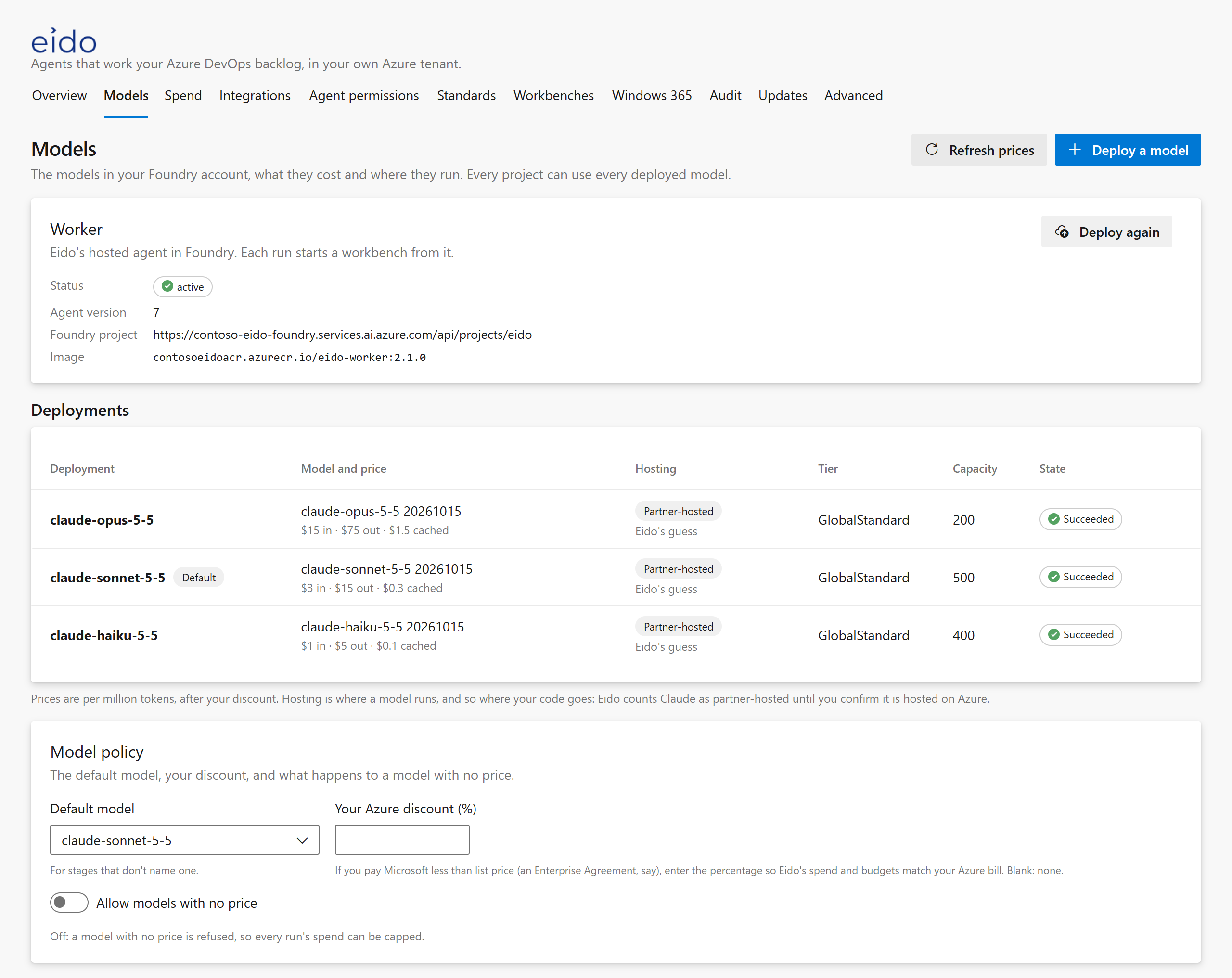
The worker#
The Worker card is Eido’s hosted agent in Foundry. Each run starts a workbench from it. Eido deploys it by itself, and it is ready when its Status says active. If it doesn’t, press Deploy again.
Deploy a model#
- Press Deploy a model. A panel lists every model your Foundry account can deploy, with its price, tiers and status.
- Find the model and choose it. Use Search models, or filter by provider and tier.
- Name it, and pick a tier and capacity. The Deployment name is what workflows call it.
- Press Deploy. It is ready when its State says Succeeded.
Change a deployment#
Each deployment’s menu has Edit, Make default and Remove.
- Edit changes its price, its hosting and its Capacity, the rate limit. Raise capacity if runs stall on rate limits.
- Remove deletes the deployment from your Foundry account. Workflows that name it need another model.
Prices#
Eido prices every model call itself, so spend and budgets work.
- It uses the Azure retail price, or Eido’s list price where Azure doesn’t list the model. It refreshes them daily, or now with Refresh prices.
- Hover a price to see where it came from: Azure retail price, Eido’s list price or Set by an admin.
- Manually set price, under Edit, is for a model Azure has no price for, or a price you negotiated. It is per million tokens, and your discount is not taken off it.
Hosting#
Hosting is where a model runs, and so where your code goes. A project’s policy can allow only some kinds: Azure-hosted, Partner-hosted, Open-weight on your compute, External and Unknown.
Eido guesses each deployment’s kind. Correct it under Where it runs. Claude counts as Partner-hosted until you set it: check the model’s page in the Foundry portal.
Model policy#
The Model policy card is under the deployments. Change it, then press Save in the bar at the bottom.
| Setting | What it does |
|---|---|
| Default model | Used by stages that don’t name a model. |
| Your Azure discount (%) | If you pay Microsoft less than list price, such as under an Enterprise Agreement. Spend and budgets then match your Azure bill. |
| Allow models with no price | Off: a model with no price is refused, so every run’s spend can be capped. On: it runs with no spend cap, outside your budgets. Set a price instead. |
Overview’s Health card lists any deployed model with No price.